

OpenGlob Single Sign-On (SSO) Integration Standard
This document serves two purposes:
1. As a public-facing blog that explains to our users how their sign-in, security, and data handling work inside the OpenGlob Accounts system.
2. As an internal and developer-facing reference for integrating any new Service Provider with OpenGlob's SSO infrastructure in the future.
The goal is simple: users should clearly understand how their login is handled, and developers should have a step-by-step guide to integrate with OpenGlob SSO with confidence.
1. Overview
OpenGlob Accounts functions as the centralized Identity Provider (IDP) for the OpenGlob ecosystem.
Whenever you sign up or log in anywhere inside the ecosystem, the authentication is managed by this single system. This gives you a consistent experience, unified security, and a single account across all future OpenGlob products.
For developers:
The IDP implements a strict, typed authentication protocol that any authorized Service Provider (downstream application) can use to delegate login and identity verification.
This document is the master reference for how OpenGlob SSO works from both a user and developer perspective.
2. System Architecture
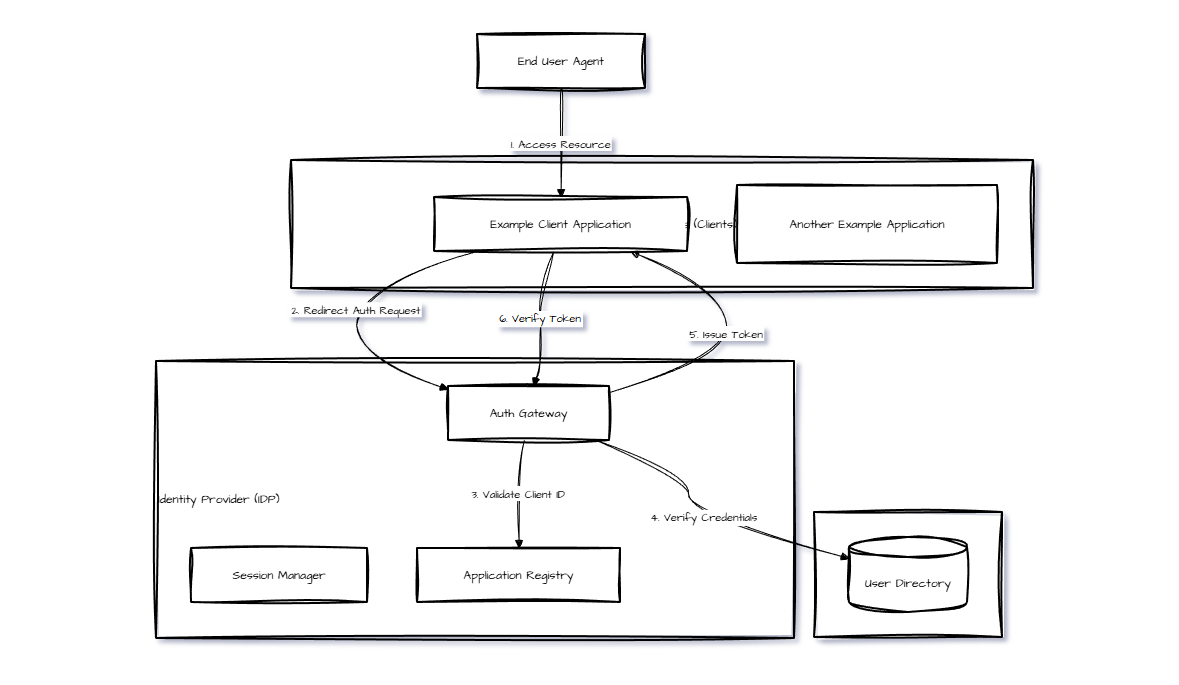
OpenGlob uses a hub-and-spoke authentication model. The Identity Provider sits at the center, responsible for:
- Account creation
- Session management
- Credential validation
- Token issuance
- Security and access control
Service Providers connect to the IDP to authenticate users, but do not store passwords or independently manage login logic.
Below is the architecture flow diagram represented using Mermaid notation:
3. Service Provider Integration Guide
If a future OpenGlob product wants to support authentication, it must follow this standard.
This ensures security, consistency, and reliability for all users.
3.1 Prerequisite: Application Registration
Before anything else, a new application must be added to the Application Registry inside the IDP. The registry defines:
-
product_id
A unique identifier string assigned to the client application. -
secret_key
A secure shared key used for handshake validation. -
callback_urls
A strict allowlist of domains where authentication responses can be sent.
The IDP rejects any request using an unregistered callback URL or incorrect secret key.
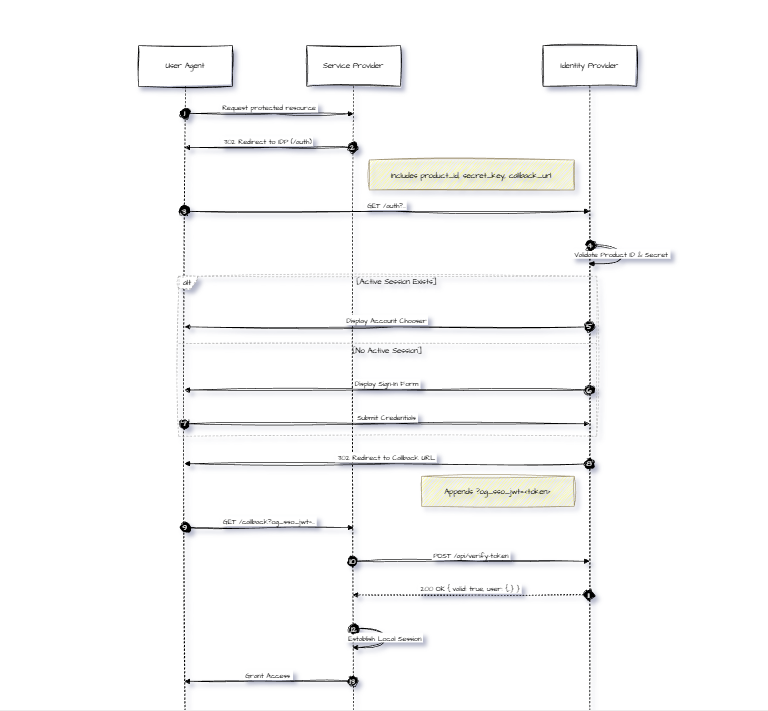
3.2 Authentication Sequence
OpenGlob uses a modified version of the Authorization Code flow.
Below is the exact flow in sequence diagram notation:
3.3. Protocol Specification
Step 1: Initiating Authentication
When a user attempts to access a protected resource, the Service Provider must redirect the user to the IDP's /auth endpoint.
Endpoint: GET https://accounts.openglob.com/auth
Required query parameters:
| Parameter | Type | Required | Description |
|---|---|---|---|
| product_id | string | Yes | Registered identifier of the calling application |
| secret_key | string | Yes | Provisioned shared key |
| callback_url | string | Yes | Must match one of the allowlisted URLs |
Example URL assembly:
# Example for Service Provider
base_url = "[https://accounts.openglob.com/auth](https://accounts.openglob.com/auth)"
params = {
    "product_id": "openglob-cloud-id-001",
    "secret_key": "your-provisioned-secret-key",
    "callback_url": "[https://cloud.openglob.com/auth/callback](https://cloud.openglob.com/auth/callback)"
}
redirect_url = f"{base_url}?{urllib.parse.urlencode(params)}"
Step 2: Handling the Callback
If authentication is successful, the IDP redirects back with a signed JWT:
Format: https://example.com/auth/callback?og_sso_jwt=<TOKEN_STRING>
The Service Provider must extract the og_sso_jwt parameter. Do not trust the token payload immediately. It must be verified against the IDP to ensure it was not spoofed.
Step 3: Token Verification
The Service Provider must invoke the IDP's verification API to validate the token's signature and the user's current account status (checking for bans or suspensions).
Endpoint: POST https://accounts.openglob.com/api/verify-token
Request Headers:

Content-Type: application/json

Request Body:

{
  "token": "eyJhbGciOiJIUzI1NiIsIn..."
}
Response (Success - 200 OK):

{
  "valid": true,
  "user": {
    "id": "OGA-1000-UUID",
    "email": "user@openglob.com",
    "name": "User Name",
    "nickname": "UserNick",
    "avatar_url": "https://...",
    "openglob_email": "user@openglob.com"
  }
}
Response (Failure - 401/403):

{
  "valid": false,
  "error": "Token expired or invalid signature"
}
3.4. Global Logout
To log a user out of the SSO session (effectively logging them out of all applications upon their next verification check), redirect the user to the logout endpoint.
Endpoint: GET https://accounts.openglob.com/logout
Optional parameter:
| Parameter | Type | Required | Description |
|---|---|---|---|
| callback_url | string | No | Redirect target after logout is completed |